7 Free Synth Plugins That Actually Sound Professional 2026 Guide
August 16, 2026
Ableton Live for Mac & Windows
August 18, 2026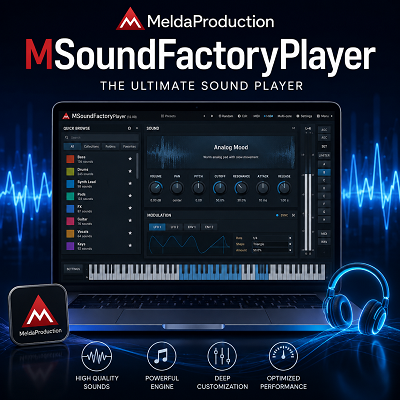
MeldaProduction MSoundFactoryPlayer is a free virtual instrument from MeldaProduction. It gives me access to selected MSoundFactory instruments without buying the full MSoundFactory. The important distinction is that the Player is mainly for playing instruments, not for building them from scratch. MeldaProduction currently lists the Player as free, MSoundFactory LE at $113, and the full MSoundFactory at $341.
That difference changed how I looked at the plugin.
At first, the name makes it easy to expect a free version of the complete MSoundFactory. It isn’t. The full version is a modular instrument with oscillators, wavetables, filters, samplers, modulation, effects, and deeper sound-design controls. The Player removes that editing side.
For me, that makes MSoundFactoryPlayer much easier to understand. I use it when I want to load a compatible instrument, find a useful sound, and get on with the music.
- MonasteryGrand is a free sampled concert piano made from around 50 GB of recorded material, with a finished instrument size of about 3.52 GB. It includes multiple microphone positions, effects, tone controls, and a separate Creative version.
- I would not call MSoundFactoryPlayer a complete free synthesizer. I would call it a free entry point into the MSoundFactory instrument system.
That is where it makes the most sense.
If you’re stocking up on completely unlocked free tools, our MNTRA FLTRS-LE review covers the same “one full feature, free” approach, just on a filter instead of an instrument.
Review
What Is MSoundFactoryPlayer?
MSoundFactoryPlayer is the free edition of MeldaProduction’s MSoundFactory platform.
The full MSoundFactory is built around a modular architecture. It can combine oscillators, filters, samplers, drum generators, effects, modulation, and other modules inside an instrument. That makes the full version suitable for detailed sound design and custom instrument creation.
The Player takes a much simpler approach.
I load an available instrument and work with the controls that the instrument provides. I can play it, automate exposed parameters, change presets, use MIDI control, and shape the sound within those limits.
I cannot open the full modular engine and rebuild the instrument.
That limitation isn’t necessarily a problem.
When I am composing, I often want a sound that is ready to play. I don’t always need to know how the instrument was constructed. If I need a piano for a melody, a pad for a background layer, or another instrument for a quick arrangement idea, the Player’s approach makes sense.
The problem starts only when I expect it to behave like the full MSoundFactory.
It doesn’t.
The Free Version Has a Clear Limitation
MeldaProduction describes MSoundFactoryPlayer as having only a few included sounds. It also supports third-party instruments made for the MSoundFactory platform. The full version includes the complete sound and instrument collection with extensive customization, while LE provides the full collection with limited customization.
I think this is the most important thing to understand before installing it.
The Player is not a giant free preset collection.
It is a player.
That means the quality of the instruments available for it matters more than the number of controls inside the Player itself.
This is why MonasteryGrand becomes so important.
MonasteryGrand Gives the Player a Real Purpose
MonasteryGrand is the first instrument I would look at after installing MSoundFactoryPlayer.
MeldaProduction created it from approximately 50 GB of recorded piano material. The finished instrument is around 3.52 GB. It uses recordings from a concert-hall piano in the Czech Republic and gives me access to multiple microphone positions.
That is a substantial amount of content for a free instrument.
The microphone controls are especially useful. I can blend the three main microphone positions to change the character of the piano rather than relying on one fixed recording. The instrument also provides Bass, Body, and Air controls, stereo width, room and ambience controls, and effects.
I also like the Creative version.
It uses looped piano material with resonators and filtering, which means I can push the sound away from a conventional acoustic piano.
That makes the library more useful to me than a simple piano plugin.
I can use the normal instrument for traditional piano parts and the Creative version when I need a sustained texture or something more experimental.
The Sound Is Better Than the Word “Free” Suggests
I wouldn’t expect a free piano to give me this much control.
The standard MonasteryGrand is aimed at normal music production, but the controls let me change its character quite a lot. I can adjust microphone levels, room size, ambience, note hardness, tone, stereo width, and effects.
That gives me more room to fit the piano into a mix.
A bright piano can work well in one arrangement but become too forward in another. Instead of immediately reaching for several external plugins, I can make useful changes inside the instrument.
I don’t see this as a replacement for a full mixing chain.
I see it as a good starting point.
I Would Not Use the Player as My Main Sound-Design Tool
This is where the Player’s limitation becomes obvious.
The full MSoundFactory is designed for building instruments. It provides modular generators, filters, samplers, per-voice modulation, global modulation, MPE support, and a modular effects system.
The Player doesn’t give me that environment.
So if I load a preset and think, “I like this, but I want to rebuild the synthesis underneath it,” I have reached the Player’s boundary.
I can still process the sound externally.
I can add EQ, compression, delay, reverb, distortion, modulation, or other plugins in my DAW.
But I cannot turn the Player into the full MSoundFactory editor.
For me, that makes the Player much better suited to composition and preset-based production than deep synthesis work.
Preset Management Is More Useful Than It Looks
The Player includes global preset management and online preset exchange. It also provides A to H switching and A to D morphing.
I find this useful when comparing sounds.
Sometimes I have several presets that could work in the same track. Loading each one separately makes comparison slower. Keeping several states available gives me a quicker way to judge them.
The A to D morphing system is also useful for sound variation.
Instead of treating four sounds as completely separate choices, I can move between them.
I wouldn’t install the Player because of this feature alone.
But once I’m using the instrument, it makes preset browsing more flexible.
Smart Randomization Can Help Find Variations
MSoundFactoryPlayer also includes several randomization modes.
I can randomize parameters completely, make smaller changes, use smart randomization, and lock parameters that I don’t want changed.
I prefer the controlled approach.
Full randomization can take a useful patch and turn it into something unusable. Small changes are much more practical.
If I already have a sound that is close to what I need, I can preserve the important characteristics and let the plugin search for variations around them.
That can save time.
It also gives me a way to find sounds I might not have reached through normal preset browsing.
MIDI Learn Is Useful for Performance
The Player includes MIDI Learn, which lets me connect available plugin parameters to a MIDI controller.
I see this as a useful feature for live playing and hands-on automation.
If I want to control a tone parameter, effect amount, or another exposed control while playing, I can assign it to a hardware knob or controller.
There is one important limitation.
MIDI Learn only controls parameters that the instrument exposes.
It does not give me access to the hidden architecture of the full MSoundFactory.
That is another reason I see the Player as a performance and playback tool rather than a modular synthesizer.
Automatic Gain Compensation Is a Good Production Detail
The Player includes automatic gain compensation.
I like this because preset comparison can become misleading when one sound is simply louder than another.
A louder patch can immediately feel more exciting.
That doesn’t necessarily mean it sounds better.
Keeping levels more consistent makes it easier for me to judge the actual sound. The Player also includes a safety brickwall limiter for output protection.
I still handle final gain staging in my DAW.
These features are there to make the instrument easier and safer to use, not to replace proper mixing.
Upsampling Gives Me Control Over Quality
MSoundFactoryPlayer provides adjustable upsampling, including very high settings, with minimum-phase and linear-phase options.
I wouldn’t automatically choose the highest value.
More processing isn’t always better for the project.
If I can’t hear a meaningful difference, I would rather leave the CPU available for other instruments and effects.
For final rendering, I can increase the quality when a particular sound benefits from it.
That is a more sensible approach than treating the largest number as the best setting.
The Processing Engine Is More Serious Than the Price Suggests
The Player supports mono, stereo, Mid/Side, separate-channel processing, surround configurations, and high channel counts for ambisonic work.
Most producers working on normal stereo music won’t need all of that.
I probably wouldn’t either.
But composers working on film, games, immersive audio, or other multichannel projects can get more value from these options.
This also tells me something about the software’s foundation.
The Player isn’t built around a tiny audio engine with a few controls.
It comes from a much larger modular instrument system.
CPU Performance Depends on the Instrument
I would avoid calling MSoundFactoryPlayer a universally low-CPU plugin.
The actual load depends on what I’m playing.
A simple synthesized sound and a large sampled piano aren’t comparable workloads. Polyphony, sample rate, buffer size, effects, and project complexity also matter.
With a sampled instrument such as MonasteryGrand, I pay more attention to memory and sample loading than I do to making a blanket statement about CPU usage.
That distinction is important.
A plugin can have an efficient engine and still require considerable storage because the instrument contains a large sample library. MonasteryGrand is a good example. Its finished instrument is about 3.52 GB because it is built from a large recorded sample set.
I would therefore judge performance based on the actual instrument and project rather than the Player label alone.
Installation Needs More Attention Than a Typical Free VST
This is the area where I would be most careful.
The current MeldaProduction documentation directs users toward MPluginManager for current installations. The older MonasteryGrand installation guide specifically notes that its instructions apply to versions 16 and lower and tells users to use MPluginManager for newer versions.
That matters because older tutorials can show a different installation process.
I would follow the current instructions rather than copying an old video step by step.
The software ecosystem also has several related components.
There is MSoundFactoryPlayer.
There is MSoundFactory LE.
There is the full MSoundFactory.
There are also additional instruments and resource packages.
I would check what each instrument needs before downloading anything large.
Storage Can Become the Bigger Issue
The Player itself is free, but the associated instruments aren’t necessarily small.
The current MonasteryGrand installation information lists MSoundFactory Essentials at about 3.14 GB and MonasteryGrand at about 3.52 GB.
That means I can quickly use more than 6 GB of storage before adding other libraries.
For a sampled piano, I don’t consider that unreasonable.
The important part is knowing it beforehand.
If I am working from a laptop with limited SSD space, I would choose the libraries carefully.
I also wouldn’t download every available Melda instrument just because it appears in the ecosystem.
The Player supports third-party instruments, but individual products can have their own requirements. MeldaProduction currently lists several Player-compatible addons, including MonasteryGrand, PowerStrings, PowerBrass, PowerWoodwinds, Electric Keys, DreamMachines, and others. Some are paid products while MonasteryGrand is free.
That gives me plenty of room to expand later.
I don’t need to install everything on day one.
The Interface Has a Learning Curve
The interface is not the first thing I would praise about MSoundFactoryPlayer.
It works.
It gives me a lot of information.
But it isn’t as immediately familiar as some modern virtual instruments.
MeldaProduction uses a dense, technical interface across its plugin range. The Player inherits much of that design approach.
I found that the interface makes more sense once I understand where the controls are and what each section is doing.
Before that, there is a lot to look at.
I don’t consider this a serious flaw.
It is simply part of the MeldaProduction workflow.
If I want a plugin with three large knobs and nothing else, this isn’t the design philosophy I am looking for.
If I am willing to spend some time learning the interface, the amount of control becomes more useful.
MonasteryGrand Also Needs the Right Playing Setup
There is another distinction I would make with the piano.
A piano can sound convincing while still feeling different under the fingers.
If I’m programming MIDI inside the DAW, I can adjust velocity and timing after recording.
If I’m playing the instrument from a weighted keyboard, the response matters much more.
That is why I would spend some time adjusting the instrument before deciding whether it works for my playing style.
The available microphone, tone, hardness, and dynamics controls give me enough room to shape the response and sound, but I wouldn’t assume the default preset will suit every keyboard player.
The important point is that sound quality and playing feel are separate tests. For a composer who mostly programs parts, MonasteryGrand can be an excellent addition. For a pianist who expects a particular acoustic piano response, I would spend more time testing it.
MSoundFactoryPlayer Works Best for Composers
This is where I think the Player has the clearest role.
When I am composing, I want to move quickly.
I don’t necessarily want to design every sound.
A finished instrument lets me focus on the arrangement.
The Player gives me that option while keeping the door open to additional MSoundFactory instruments later.
That makes it particularly interesting for composers working across different styles, and it’s a reasonable first stop before browsing more dedicated synths and virtual instruments for a fuller sound-design setup.
I can use a normal piano.
I can use a more processed texture.
I can add other compatible instruments as my needs grow.
The system doesn’t force me to buy the complete MSoundFactory immediately.
Sound Designers Will Notice the Restrictions
For sound designers, the Player is a different story.
If my main goal is to experiment with synthesis architecture, I would quickly want the full MSoundFactory.
The full version provides the modular generator system, modular effects, oscillators, filters, samplers, modulation, and deeper customization.
The Player intentionally removes that level of access.
So I wouldn’t buy or install it with the expectation that I can create completely new instruments.
I would use it as a playback platform.
That makes the restriction much easier to accept.
MSoundFactoryPlayer vs MSoundFactory LE vs MSoundFactory
The difference between the three editions is straightforward once I look at what I actually need.
| Version | Current Listed Price | Included Sounds | Customization |
|---|---|---|---|
| MSoundFactoryPlayer | Free | Few sounds and compatible third-party instruments | None |
| MSoundFactory LE | $113 | Full sound and instrument collection | Limited |
| MSoundFactory | $341 | Full sound and instrument collection | Full |
These are the current differences shown by MeldaProduction.
I would choose MSoundFactoryPlayer if I mainly want free instruments.
I would choose MSoundFactory LE if I want the full factory sound collection but don’t need deep editing.
I would choose MSoundFactory if I want to build and modify instruments.
That makes the Player a sensible starting point.
I don’t need to spend $341 just to get a free piano.
What I Like About MSoundFactoryPlayer
The biggest strength is the combination of a free player and serious instrument options.
MonasteryGrand gives me a substantial piano library without an additional purchase. It has enough controls to fit different production situations, and the Creative version makes it useful beyond traditional piano work.
I also like the workflow features.
Preset switching is useful.
MIDI Learn is useful.
Smart randomization can help when I need variations.
Automatic gain compensation makes preset comparison easier.
Upsampling and multichannel processing give me additional control when I need it.
None of these features needs to dominate the review.
Together, they make the Player feel more complete.
What I Would Improve
The first thing I would improve is the setup experience.
A new user should be able to understand immediately which installer, player, resource pack, and instrument are required.
The current documentation has improved with MPluginManager, but the existence of older installation instructions can still create unnecessary confusion.
I would also make the free content easier to identify.
MonasteryGrand is clearly valuable, but a new user should not have to understand the wider MSoundFactory ecosystem before knowing which instruments can be used with the free Player.
The interface is another area I would simplify for beginners.
I don’t want MeldaProduction to remove its depth.
I would simply make the first experience easier.
Who Should Use MSoundFactoryPlayer?
I would recommend MSoundFactoryPlayer to:
- Music producers who want free virtual instruments
- Composers who need additional sounds
- Producers looking for a serious free piano
- Users who want to try the MSoundFactory ecosystem
- MIDI producers who want flexible instrument control
- Sound editors who need another VST instrument source
- Producers who want to expand their library gradually
I would not make it my first choice if my main goal is modular synthesis.
For that, I would move to MSoundFactory itself.
Features
- Free MSoundFactoryPlayer edition
- Compatible third-party MSoundFactory instruments
- MonasteryGrand free piano
- MonasteryGrand Creative instrument
- Global preset management
- Online preset exchange
- A to H preset switching
- A to D preset morphing
- Smart randomization
- Subtle randomization
- Full randomization
- Parameter locking
- MIDI Learn
- Automatic gain compensation
- Safety brickwall limiter
- Adjustable upsampling
- Minimum-phase and linear-phase processing options
- 64-bit audio processing
- Mono processing
- Stereo processing
- Mid/Side processing
- Separate-channel processing
- Surround processing
- Ambisonic processing
- GPU-accelerated interface
- Resizable interface
- HDPI and Retina support
- VST support
- VST3 support
- AU support on macOS
- AAX support
- Windows support
- macOS support
- Apple Silicon support
- Free MSoundFactoryPlayer updates according to MeldaProduction
Conclusion
I would keep MeldaProduction MSoundFactoryPlayer installed if I wanted a free instrument platform with room to grow.
The important thing is to understand what it is.
It isn’t the full MSoundFactory for free.
It is a free player for selected instruments.
Once I look at it that way, the limitations make much more sense.
For me, MonasteryGrand is the strongest reason to use it. A 3.52 GB sampled piano built from around 50 GB of recorded material is far more substantial than I would expect from a free instrument. The multiple microphones, tone controls, effects, ambience controls, and Creative version make it useful for both normal composition and more processed sounds.
The Player itself also has enough workflow features to stay useful after the initial download. Preset management, MIDI Learn, randomization, gain compensation, upsampling, and extensive channel support give me more control than a basic free instrument player.
My main caution is the installation process.
I would use the current MPluginManager workflow, check the requirements for each instrument, and keep an eye on storage before downloading large libraries. MonasteryGrand alone requires several gigabytes once the required resources are included.
I would also give the interface some time.
It isn’t the kind of plugin I would judge from the first few minutes. The layout is dense, but that density comes with useful control once I understand the system.
If I want a free VST instrument with access to quality MSoundFactory instruments, MSoundFactoryPlayer is worth trying. If I want a free sampled piano, MonasteryGrand is a strong reason to install it. If I want to design instruments from the ground up, I would move to the full MSoundFactory.
The Player works best when I use it for what it was designed to do: play serious instruments without requiring me to buy the complete modular system.
Looking for more free tools to fill out your template? Browse the full Synths category for other instruments, or head to VST Plugins for everything we’ve reviewed across compression, EQ, reverb, and drums. If you want another example of a “free but fully unlocked” plugin, our MNTRA FLTRS-LE review is worth a look.
Try MSoundFactoryPlayer Free
Install the free Player and load MonasteryGrand to hear the instrument ecosystem for yourself.