
Waves Ultimate 17 for Mac & Windows
August 21, 2026
Chandler Limited® Curve Bender Mastering EQ for Mac & Windows
August 22, 2026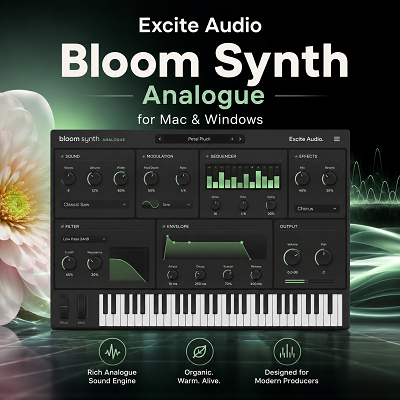
Excite Audio Bloom Synth Analogue is a virtual instrument built around samples pulled from vintage synthesizers. It ships with chords, basses, leads, arpeggios, and phrases that follow the key and tempo of your project automatically, then layers on sample editing, sequencing, modulation, and effects.
The core idea is practical: instead of starting from a bare oscillator and building a patch from nothing, you start with an already-recorded synth sound and reshape it into something usable. That shifts Bloom’s focus toward songwriting and production speed rather than traditional synthesis.
- Bloom isn’t a detailed emulation of any single analogue synth — it works from recorded hardware material as its raw ingredient, closer to a sample-based sequencing instrument than a synthesizer.
- It ships with 250+ presets, 112 samples across eight banks, and room to import up to 112 of your own samples.
- It’s best used as a complementary tool alongside a deeper synth, not a replacement for one.
One expectation worth setting early — Bloom isn’t a detailed emulation of any single analogue synth. It works from recorded hardware material as its raw ingredient. Think of it less as a synthesizer and more as a sample-based sequencing instrument with analogue character baked in.
Review
A Different Approach to Analogue Sound
Bloom’s workflow breaks from a conventional synth almost immediately. There’s no blank oscillator section to fill in — you trigger chords, leads, basses, arps, and phrases right away, then shape how those sounds behave from there. Excite Audio built in over 250 presets spread across seven categories: Basslines, Experimental, Full Arrangement, High Energy, Low Energy, Melodic, and Rhythmic.
This kind of workflow pays off most when you’re already deep in an arrangement and need a musical idea fast. You can audition a bass line or melodic sequence without sinking several minutes into building the basic patch first — though that speed comes at the cost of the deeper control a traditional synth offers.
Where the Analogue Character Comes From
The analogue feel in Bloom comes directly from its source material — samples taken from vintage hardware synths, carrying the drift, saturation, and character that hardware is known for. Because that character already lives in the recordings, you’re not trying to fake analogue behavior with a clean digital oscillator; you’re manipulating something that already has it.
The tradeoff is control. If you want to rebuild a sound from oscillators, filters, envelopes, and modulation from the ground up, a dedicated synthesizer is the better tool. Bloom makes more sense when the goal is shaping an existing sound rather than generating one from scratch.
The Preset Library and the Main Page
The 250-plus presets are organized by musical function rather than synthesis type, so you can search by “bassline” or “melodic part” instead of digging through generic patch names. That’s genuinely useful mid-writing session — if a track already has drums and bass but needs a melodic layer, the Melodic category gets you there faster than browsing hundreds of unrelated patches.
The Full Arrangement category deserves a caveat: these presets combine bass, pads or chords, and melodic elements into one package, which sounds convenient but rarely survives untouched in a finished track. They work better as sketches than final parts — expect to strip out what doesn’t fit and rebuild around what does.
The Main Page itself keeps things fast. Eight sample banks hold 112 samples total, with 14 white keys triggering them and the black keys handling modifiers and performance functions. Banks can be swapped wholesale, or individual samples dragged into open slots. The practical workflow is: load a preset, play it, swap a sample, try a modifier, then move to the Edit Page if more control is needed.
Macros for Fast Character Changes
Four macros — Tube, Age, Circuit, and Expand — let you reshape a preset’s character broadly without opening every individual parameter. This matters most during auditioning: rather than deciding whether a preset is “perfect” as-is, a couple of macro moves can tell you quickly whether it fits the track, which saves real time when you’re cycling through options.
The Edit Page: Where Bloom Gets Serious
This is where Bloom stops being just a preset player. The Edit Page exposes sample start and end points, playback direction, speed, pitch, fine tuning, formant, pitch warp, attack, release, pan, volume, crossfade, and multiple playback modes — forward, backward, pendulum, or looped, plus Hold, Latch, and Relative modes.
These controls matter when a preset is close but not quite right. Reversing a sample can flip the entire feel of a phrase. Moving the start point can strip out an unwanted transient. Slowing playback can turn a short synth stab into a sustained texture. This is the point where Bloom starts functioning more like a sound-design tool than a sample browser.
The Sequencer
The built-in Bloom Sequencer handles triggering and layering of one-shots and looping sequences, with step rate, sync, swing, step count, latch, beat retrigger, velocity, probability, timing, and performance controls, plus sample and modulation randomization.
Probability is the standout feature here. A pattern that repeats identically every cycle gets predictable fast; probability introduces variation automatically instead of requiring manual edits to every step. The sequencer can also drive pitch, volume, filters, and effects, which gives even a simple pattern more movement over time.
Beyond a Loop Player
The distinction matters: Bloom isn’t just triggering fixed loops on a timeline. You can alter direction, speed, pitch, timing, and sequencing of the source material, or replace it entirely with your own samples. That control over the material before it reaches the arrangement is what separates Bloom from a straightforward loop library — it functions closer to a creative sampler-sequencer hybrid.
Importing Your Own Samples
Bloom supports importing up to 112 of your own samples, swappable at any time. This is arguably the feature with the most long-term value for experienced producers: record something from a hardware synth you already own, bring it into Bloom, and apply its sequencing and editing tools to your own material. That turns Bloom from a fixed factory library into an ongoing production tool rather than a one-time preset pack — particularly useful for short hardware phrases, unusual synth hits, and experimental textures. If you want to see a free instrument built around the same “manipulate a fixed library” idea, MeldaProduction’s MSoundFactoryPlayer takes a similar approach, just centered on a sampled concert piano instead of synth phrases.
Built-In Effects
Bloom includes three rearrangeable effects sections: Modulation (chorus, vibrato, flanger), Reverb (Plate, Hall, Spring), and Delay (Stereo, Ping Pong), plus low-cut and high-cut filtering. These are useful for getting a preset closer to a finished sound before it hits the DAW, but they’re not a substitute for a dedicated mixing chain — think of them as finishing touches inside Bloom, not a replacement for outboard effects plugins.
If you want a dedicated filter with more character than a basic low-cut and high-cut pair, our review of MNTRA’s FLTRS-LE covers a free, fully unlocked Jupiter-6-style circuit worth adding to the chain. And if Bloom’s built-in reverb and delay leave you wanting a deeper mixing and mastering toolkit downstream, our Waves Ultimate review covers a 240-plus plugin subscription that picks up where Bloom’s stock effects leave off.
Setting Expectations: “Analogue” Doesn’t Mean “Deep Synthesis”
This is the point worth repeating: Bloom sounds and behaves differently from a traditional analogue-modeled synthesizer, and it shouldn’t be judged against something like a Minimoog-style oscillator-and-filter architecture. Its analogue character comes from the source recordings, not from modeled circuitry.
That’s actually where its strength lies — you start with a sound that already carries hardware imperfections and tonal character, without needing to program them in. The cost is reduced control over the actual sound-generation process. If full control matters more than speed, a dedicated synth wins. If manipulating already-analogue material is the goal, Bloom is the better fit.
Workflow in Practice
The fastest way to use an instrument like this isn’t to audition every preset start to finish — it’s to start with the role the sound needs to fill. Need bass? Go to Basslines. Need a melody? Check Melodic. Need movement? Rhythmic or Experimental. Once something close turns up, changing the sample or sequence usually gets to a usable result faster than continuing to search for a perfect match. In practice, the best result is rarely the untouched preset — it’s the version after enough of it has been changed to fit the arrangement it’s going into.
Best Fit: Fast Electronic Production
Bloom suits styles where synth phrases and movement carry the track — synth-pop, electronic music, synthwave, retro and modern pop, experimental electronic work, electronic scoring, bass sequences, arpeggios, and general sound design. Excite Audio positions it similarly, aiming at pop, synth-pop, leftfield electronic, and experimental production. For composition work outside those styles, it’s better used as a source of electronic color and musical ideas than as a full scoring solution.
Who Shouldn’t Buy It First
If building every sound from scratch is part of the appeal, Bloom isn’t the right starting point — a dedicated synthesizer offers far more control over oscillators, filters, envelopes, and modulation architecture. Bloom solves a different problem: getting from an existing sound to a usable musical part quickly. That’s its value, not a replacement for deep synthesis.
System Compatibility
Bloom runs on both Mac and Windows. On macOS, Excite Audio lists 10.15 or later, with support for both Intel and native Apple Silicon, in VST, VST3, AU, AAX, and Standalone formats. On Windows, support starts at Windows 7, with VST, VST3, AAX, and Standalone formats, 64-bit only. Listed DAW compatibility includes Ableton Live, Pro Tools, Logic Pro, FL Studio, Cubase, Nuendo, Reaper, and Reason, among others.
As with any plugin, it’s worth testing inside your exact DAW and system configuration before building a large project around it — published compatibility lists confirm what formats and OS versions are supported, but they don’t substitute for checking real-world CPU load with your own buffer size and instance count in your own sessions. Our Logic Pro review covers that kind of real-world CPU testing in more depth if you’re running Bloom inside Apple’s DAW specifically.
Overall Take
Bloom Synth Analogue is a specialist tool rather than a general-purpose synth. Its value isn’t parameter depth — it’s how quickly vintage synth material can be turned into something musical. Start with a preset, swap a sample, adjust the sequence, add movement, then finish processing in the DAW.
That workflow will appeal more to producers who want speed than to those who want to build a patch from the oscillator up. It’s not a replacement for a deeper synthesizer when that level of control is genuinely needed — it works best as a complementary tool alongside one.
Features at a Glance
- 250+ presets across seven categories
- Eight sample banks, 112 supplied samples
- Support for up to 112 user-imported samples
- 14 sample-trigger keys, host BPM sync, key selection
- Four macros: Tube, Age, Circuit, Expand
- Five factory + five custom modifiers
- Half-time, double-time, and reverse playback; octave up/down
- Forward, backward, pendulum, and loop playback modes
- Hold, Latch, and Relative playback modes
- Start/end markers, snap to grid, snap to transient, crossfade
- Attack, release, pitch, fine tune, formant, pitch warp, pan, volume
- Four choke groups
- Built-in sequencer: step rate, sync, swing, velocity, probability, timing/performance controls
- Sample and modulation randomization
- Pitch, volume, and filter modulation
- Low-cut/high-cut filtering
- Modulation (chorus, vibrato, flanger), Reverb (Plate, Hall, Spring), Delay (Stereo, Ping Pong)
- Standalone operation; VST, VST3, AU, AAX formats
- Native Apple Silicon support; 64-bit only
Alternatives
Arturia Analog Lab Pro — the better pick for access to a huge range of virtual keyboards and classic synth emulations. Bloom’s focus is narrower; Analog Lab Pro wins on variety, Bloom wins on a focused, sequencing-driven workflow with vintage material.
UVI Vintage Vault — aimed at producers who want a large collection of vintage instrument emulations. Choose Vintage Vault for sound-library breadth, Bloom for a faster, sample-and-sequence-centered workflow.
Xfer Serum — the stronger choice for deep wavetable sound design, with full control over oscillators, wavetables, filters, and modulation. Choose Serum to design a sound from nothing; choose Bloom to start from recorded synth material and turn it into a part quickly.
A dedicated analogue-modeled synth — the right route when full control over oscillators, filters, envelopes, and the entire synthesis path matters more than speed. Bloom trades that control for faster access to sampled, sequenced material.
Conclusion
Excite Audio Bloom Synth Analogue is a focused production instrument, not a replacement for a traditional synthesizer. Its real strength is combining vintage synth samples with fast preset browsing, sample editing, sequencing, modulation, and effects — 250+ presets, 112 supplied samples across eight banks, four macros, and support for importing up to 112 of your own samples.
The workflow is the standout: start with a bass, lead, chord, arp, or phrase and shape it into a usable part without building the sound from scratch. The Edit Page adds enough control to move a preset away from feeling like a stock sound, the sequencer adds motion, and user sample import gives the instrument staying power beyond its factory library.
The limitation is just as clear — for sound design from the oscillator level up, a dedicated synth like Serum is the better tool. For fast electronic production, synth-pop, retro sounds, melodic sequences, and experimental ideas, Bloom earns its place.
Bloom Synth Analogue works best as a complementary creative instrument rather than an all-purpose synthesizer — its value is in making the path from vintage synth sample to usable musical idea quick and direct.
Try Bloom Synth Analogue
Download Bloom and audition the preset library on your own arrangement before deciding if it earns a permanent slot in your template.