Excite Audio Bloom Synth Analogue for Mac & Windows
August 22, 2026
ANTelope Audio MG4+ for Mac & Windows
August 23, 2026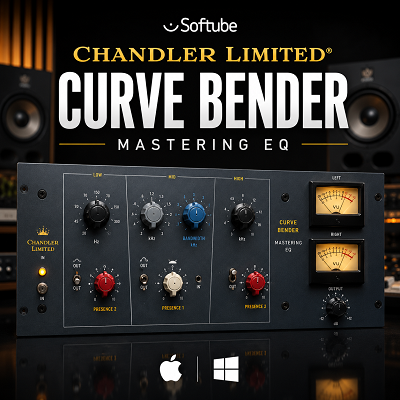
The Chandler Limited® Curve Bender Mastering EQ is a four-band equalizer for Mac and Windows. It is made for mixing and mastering. Its design is based on the Chandler Limited Curve Bender hardware, which draws from the EQ design used in the EMI TG12345 console at Abbey Road Studios.
The plug-in gives you 51 fixed frequency choices. It also includes high-pass and low-pass filters, Mid/Side mode, channel linking, and a Multiply setting for stronger EQ changes.
Curve Bender is not meant to replace a modern EQ with full frequency control. Its main strength is broad tone control.
I would use Curve Bender when a track or mix needs more body, presence, brightness, or overall tone. For a very specific frequency problem, I would use a more precise EQ.
Review
How Curve Bender Works
Curve Bender uses four main EQ sections: Bass, Presence 2, Presence 1, and Treble. The frequency choices are fixed — you cannot type in any frequency you want.
| EQ Section | Frequency Range |
|---|---|
| Bass | 35 Hz – 300 Hz |
| Presence 2 | 300 Hz – 3.6 kHz |
| Presence 1 | 800 Hz – 8.1 kHz |
| Treble | 3.6 kHz – 20 kHz |
This is less flexible than many modern EQs. It can also make the process easier — you select a frequency, make a small change, and listen. There are fewer settings to adjust.
This works well when I want to shape the overall sound instead of fixing one small problem.
Low-End Control
The Bass section can add weight to a mix without requiring several EQ bands. This can be useful for bass guitar, kick drums, synth bass, and full mixes.
Sound On Sound’s testing found that the Curve Bender could add strong low-end weight while keeping the result musical.
I would use this section when the low end feels weak or lacks body. I would not use it simply because more bass sounds impressive in solo. Too much low end can quickly make a mix feel heavy.
High-End Control
The Treble section is one of the most useful parts of Curve Bender. The hardware version can boost the upper range up to 20 kHz. Sound On Sound found the 16 kHz shelf useful for adding air and openness.
This is where Curve Bender can be very effective on a finished mix. A small high-frequency boost can make a recording feel more open — it does not always need a large change. This is also an area where restraint matters. Too much top-end boost can make vocals, cymbals, and synths sound sharp.
The Two Presence Sections
Curve Bender has two separate presence sections. This gives you more control over the middle and upper-middle part of a track — areas important for vocals, guitars, pianos, synths, drums, and many other instruments.
A vocal may need more presence. A guitar may need more clarity. A synth may need to stand out more.
The two presence sections make Curve Bender useful on individual tracks as well as full mixes. You are not limited to using it as a mastering EQ.
The Multiply Setting
The normal EQ range goes up to 5 dB of boost or cut. The Multiply setting increases this to 15 dB and makes the EQ change more focused, giving you more control when a stronger change is needed.
I would normally keep Multiply off when working on a finished master. Small changes are usually enough. For drums, bass, guitars, and synths, the extra range can be more useful.
Mid/Side Mode
Curve Bender includes Mid/Side mode. This lets you work on the center and sides of a stereo track separately. For example, a lead vocal may sit in the center while guitars and effects sit on the sides. You can change the tone of the center without making the same change to the sides.
I would use this only when I have a clear reason to separate the center from the sides. It is easy to change the stereo balance too much. A small change can help. A large change can make the mix feel unbalanced.
Channel Linking
The channels can be linked for normal stereo work. They can also be separated when the left and right sides need different settings — useful when working with stereo recordings that are not perfectly balanced.
For mastering, I would normally keep the channels linked. I would separate them only when the two sides clearly need different treatment.
High-Pass and Low-Pass Filters
Curve Bender includes both high-pass and low-pass filters. The high-pass filter has settings from 20 Hz to 320 Hz. The low-pass filter has settings from 30 kHz down to 2 kHz. Both use a 6 dB per octave slope.
These filters are useful for broad changes. They are not designed for detailed filtering.
I would use these filters for simple cleanup. If I needed a very exact cutoff, I would use another EQ. If you want a filter with more character than a plain 6 dB/octave cleanup slope, our review of MNTRA’s FLTRS-LE covers a free, fully unlocked Jupiter-6-style circuit worth having in the same folder for creative filtering rather than cleanup.
Curve Bender on the Mix Bus
The mix bus is one of the best places to try Curve Bender. A mix may already be balanced but still feel slightly flat. A small low-end change can add weight. A small presence change can bring important parts forward. A gentle high-end change can make the whole mix feel more open.
I would use Curve Bender near the end of the mix rather than using it to repair serious problems. If a mix has a harsh frequency, I would fix that first with a precise EQ. Curve Bender is better for the overall tone.
Curve Bender on Vocals
Curve Bender can work well on vocals. The presence sections can help a vocal sound clearer and more forward. The low section can add body to a thin vocal. The high section can add openness.
I would use small changes on vocals. If the vocal has one harsh frequency, Curve Bender is not the first tool I would reach for. A precise EQ can deal with that problem more accurately. Curve Bender is better when the whole vocal needs a different tone.
Curve Bender on Drums
Drums can benefit from broad EQ changes. The low band can add weight. The presence bands can help the attack stand out. The high band can add brightness.
Tape Op’s testing also found useful results when Curve Bender was used on drums and toms.
The plug-in works well when the drum sound needs to change as a whole. It is less useful when one narrow frequency needs to be removed.
Curve Bender on Synths
Synths often cover a large part of the frequency range. A pad can contain deep bass, middle frequencies, and high frequencies at the same time. A lead synth can also compete with vocals.
Curve Bender can help change the overall tone without requiring many EQ bands.
I would use it when a synth sounds too dark, thin, heavy, or dull. If there is one unwanted frequency, I would use a more precise EQ first.
Curve Bender for Mastering
Curve Bender can be useful during mastering, but it should not be treated as the only EQ you need.
Sound On Sound’s testing showed that very small changes could make a useful difference. One example used 1 dB at 91 Hz and 1 dB at 2.8 kHz to improve the tone of a recording. That is a good example of how little EQ may be needed.
I would use Curve Bender for broad changes on a finished mix. I would use another EQ for exact corrections. This gives both processors a clear job. If you’re building out a broader mastering chain beyond a single EQ, our Waves Ultimate review covers a 240-plus plugin subscription that fills in the compressors, limiters, and restoration tools Curve Bender doesn’t try to be.
Is Curve Bender a Color EQ?
Curve Bender has a noticeable character, but it is not mainly a distortion plug-in. Its sound comes from the combination of its EQ curves and the hardware behavior that Softube modeled.
Tape Op also found that the modeled transformers could add a small amount of extra character to the signal.
I would describe Curve Bender as a character EQ. It can change the feel of a recording even when the EQ changes are small. That is different from using a saturation plug-in to add obvious distortion.
The Main Weakness
The biggest limitation is precision. You cannot choose any frequency you want. You also do not get the same detailed control found in modern digital EQs. This matters when you need to remove a narrow problem.
Curve Bender works best as a second EQ. A precise EQ can handle technical corrections. Curve Bender can then shape the overall tone. That combination makes more sense than expecting one plug-in to do everything.
It Can Be Easy to Overuse
Curve Bender can make a mix sound better very quickly. That can also be a problem. Once you hear a pleasing change, it is easy to keep increasing the settings.
Always compare the processed and unprocessed versions at similar volume. A louder signal can sound better even when the actual change is not an improvement. This is especially important when Curve Bender is used on a mix bus or master.
Mac and Windows Support
The native Curve Bender plug-in supports common Mac and Windows production systems, in the major plugin formats used by most DAWs. Softube’s current product information should be checked before installation, since operating system support can change with future updates.
| Requirement | Details |
|---|---|
| Platforms | Mac and Windows |
| Plugin formats | AU, VST, VST3, AAX |
| Intended use | Mixing and mastering |
| DAW compatibility | Major DAWs supporting AU/VST/VST3/AAX, including Ableton Live, FL Studio, and Logic Pro |
| Before installing | Check Softube’s current product page for the latest supported OS versions |
Features
Alternatives
FabFilter Pro-Q 3
FabFilter Pro-Q 3 is a better choice when you need exact EQ control. It is useful for removing unwanted frequencies, fixing harsh sounds, and making detailed changes.
I would choose Pro-Q 3 for correction and Curve Bender for tone. They serve different purposes.
Softube Equalizers
Softube Equalizers gives you more control than Curve Bender. It is a better option if you want one EQ that can handle many different jobs.
Choose Softube Equalizers when flexibility matters more than the specific Curve Bender sound. Choose Curve Bender when you want its particular tone and simple workflow.
Weiss EQ1
Weiss EQ1 is designed for precise mastering work. It is a better option when you want clean and accurate EQ changes.
Choose Weiss EQ1 when you want the EQ to stay quiet and controlled. Choose Curve Bender when you want the EQ to add its own character.
AMEK EQ 200
AMEK EQ 200 is another strong choice for mastering. It gives you more detailed control while keeping a hardware-inspired approach.
AMEK EQ 200 is better when you need more control. Curve Bender is better when you want a simpler set of controls and a distinct sound.
Abbey Road TG Mastering Chain
Abbey Road TG Mastering Chain is useful if you want more than EQ. It combines several processing stages in one plug-in.
Choose Curve Bender when EQ is your main need. Choose the TG Mastering Chain when you want a wider mastering tool.
Quick Comparison: Curve Bender vs Other EQs
| Need | Best Choice |
|---|---|
| Exact EQ correction | FabFilter Pro-Q 3 |
| Removing a narrow frequency | FabFilter Pro-Q 3 |
| Detailed EQ work | FabFilter Pro-Q 3 |
| Broad tone changes | Curve Bender |
| Mix bus tone | Curve Bender |
| Mastering tone | Curve Bender |
| Clean mastering EQ | Weiss EQ1 |
| More EQ control | Softube Equalizers |
| Hardware-style EQ workflow | Curve Bender |
| TG-style sound | Curve Bender |
Conclusion
The Chandler Limited® Curve Bender Mastering EQ has a clear purpose. It is made for broad tone changes. It can add weight to the low end, bring out the middle, and add openness to the top end. Its 51 frequency choices give you more control than the original TG-style design, while the Multiply setting allows stronger changes when needed.
The main advantage is its sound and simple workflow. The main weakness is precision. You cannot use it for every EQ job.
Curve Bender makes the most sense when you already have a good general-purpose EQ and want another tool for tone shaping. Use a precise EQ to fix problems. Use Curve Bender to shape the sound.
The practical results can be subtle. A change of 1 dB can be enough. The best results often come from listening to the complete mix instead of making large changes.
It is also important to avoid judging the plug-in only because it makes the signal louder or brighter. Always compare the processed and unprocessed versions at similar volume.
For producers and composers, Curve Bender can be useful on vocals, drums, bass, synths, buses, and finished mixes. For mastering, it works best when the goal is broad tone rather than exact correction.
The price also needs consideration. It is a specialist EQ, not something every producer needs.
If you want a precise EQ, there are better choices. If you want an EQ that can give a finished track more weight, presence, air, and character with a small number of controls, the Chandler Limited Curve Bender is worth considering.
Try Curve Bender
Test the 51 fixed frequencies and Multiply mode on your own mix before deciding if it earns a slot next to your main EQ.